Integrated Postsecondary Education Data System (IPEDS) 2024-25 through 2026-27
Integrated Postsecondary Education Data System (IPEDS) 2025-26 through 2026-27
ACTS Package ICR and Instructions Revision 4 Nonsub Change - 20251217 - CLEAN
Integrated Postsecondary Education Data System (IPEDS) 2024-25 through 2026-27
OMB: 1850-0582
Integrated
Postsecondary Education Data System (IPEDS) 2024-25
2025-26 through 2026-27
Admissions and Consumer Transparency Supplement (ACTS) Package
OMB No. 1850-0582 v. 33
Submitted by:
National Center for Education Statistics (NCES)
Institute of Education Sciences
U.S. Department of Education
December 2025
ACTS Package 2025-26 and 2026-27 Data Collections
Contents
Integrated
Postsecondary Education Data System (IPEDS) 2024-25
2025-26 through 2026-27 1
General Notes About the Materials in this Volume 3
A. ACTS General Instructions for IPEDS Data Collection System Survey Materials Website 4
B. Instructions for the ACTS Aggregator Tool Processing Portal 12
C. Student-Level File Instructions and Codebook 30
Undergraduate Admissions Codebook 33
Undergraduate Completers Codebook 57
Graduate Admissions Codebook 62
Graduate Completers Codebook 75
General Notes About the Materials in this Volume
1. Materials included in this package are provided to all eligible institutions the IPEDS website.
2. The dates included in this volume refer to the 2025-26 collection year. Dates for some elements will change in later collection years, including the 2026-27 collection year. See the table below for more details.
2025-26 Collection |
|
Data domains reported |
Undergraduate Students Admissions: Academic Years 2019-20, 2020-21, 2021-22, 2022-23, 2023-24, 2024-25, 2025-26 Enrollment: Academic Years 2019-20, 2020-21, 2021-22, 2022-23, 2023-24, 2024-25, 2025-26 Academics: Academic Years 2019-20, 2020-21, 2021-22, 2022-23, 2023-24, 2024-25 Financial Aid & Cost: Academic Years 2019-20, 2020-21, 2021-22, 2022-23, 2023-24, 2024-25 Graduate Rates: Academic Years 2019-20, 2020-21, 2021-22 Cumulative GPA: Academic Years 2019-20, 2020-21, 2021-22, 2022-23, 2023-24, 2024-25
Graduate Students Admissions: Academic Years 2019-20, 2020-21, 2021-22, 2022-23, 2023-24, 2024-25, 2025-26 Academics: Academic Years 2019-20, 2020-21, 2021-22, 2022-23, 2023-24, 2024-25 Financial Aid & Cost: Academic Years 2019-20, 2020-21, 2021-22, 2022-23, 2023-24, 2024-25 Cumulative GPA: Academic Years 2019-20, 2020-21, 2021-22, 2022-23, 2023-24, 2024-25
|
2026-27 Collection |
|
Data domains reported |
Undergraduate Students Admissions: Academic Year 2026-27 Enrollment: Academic Year 2026-27 Academics: Academic Year 2025-26 Financial Aid & Cost: Academic Year 2025-26 Graduate Rates: Academic Years 2022-23 Cumulative GPA: Academic Year 2025-26
Graduate Students Admissions: Academic Year 2026-27 Academics: Academic Year 2025-26 Financial Aid & Cost: Academic Year 2025-26 Cumulative GPA: Academic Year 2025-26
|
A. ACTS General Instructions for IPEDS Data Collection System Survey Materials Website
Purpose of Admissions and Consumer Transparency Supplement (ACTS) Survey Component
The primary purpose of the IPEDS Admissions and Consumer Transparency Supplement (ACTS) survey component is to expand the scope of information collected about the undergraduate and graduate admissions process, financial aid awarding process, enrollment in courses and programs, and outcomes and completions in order to comply with the Secretary of Education’s directive that followed the August 7, 2025 Ensuring Transparency in Higher Education Admissions Executive Memorandum.
Reporting Periods Covered and Coverage
Undergraduate Students |
||
Data Domain |
Coverage |
Reporting Years |
Admissions |
All applicants, that is, the group of individuals who fulfilled the institution's requirements to be considered for undergraduate admission (including payment or waiving of the application fee, if any) and who have been notified of one of the following actions: admission, nonadmission, placement on waiting list, or application withdrawn by applicant or institution, by October 15 of the academic year. |
2025-26 2024-25 2023-24 2022-23 2021-22 2020-21 2019-20 |
Enrollment |
All enrolled students, where enrolled students are first-time, full-time, degree/certificate-seeking undergraduate students. |
2025-26 2024-25 2023-24 2022-23 2021-22 2020-21 |
Academics |
All enrolled students, where enrolled students are first-time, full-time, degree/certificate-seeking undergraduate students. |
2024-25 2023-24 2022-23 2021-22 2020-21 2019-20 |
Financial Aid and Cost |
All enrolled students, where enrolled students are first-time, full-time, degree/certificate-seeking undergraduate students. |
2024-25 2023-24 2022-23 2021-22 2020-21 2019-20 |
Graduation Rates |
Bachelor's or equivalent degree-seeking subcohort, which is defined as the cohort of students how were seeking a bachelor's or equivalent degree upon entry. |
2021-22 2020-21 2019-20 |
Cumulative GPA |
Undergraduate completers, that is, the group of individuals who completed a credential-bearing undergraduate academic program and received an undergraduate degree or certificate during this Academic Year (July 1 to June 30), regardless of the AY in which they initially enrolled. |
2024-25 2023-24 2022-23 2021-22 2020-21 2019-20 |
Graduate Students |
||
Data Domain |
Coverage |
Reporting Years |
Admissions |
All applicants, that is the group of individuals who fulfilled the institution's requirements to be considered for admission into a graduate program of study (including payment or waiving of the application fee, if any) and who has been notified of one of the following actions: admission, nonadmission, placement on waiting list, or application withdrawn by applicant or institution, by October 15 of the academic year. |
2025-26 2024-25 2023-24 2022-23 2021-22 2020-21 2019-20 |
Academics |
All enrolled students, where enrolled students are full-time, degree/certificate-seeking graduate students. |
2024-25 2023-24 2022-23 2021-22 2020-21 2019-20 |
Financial Aid and Cost |
All enrolled students, where enrolled students are full-time, degree/certificate-seeking graduate students. |
2024-25 2023-24 2022-23 2021-22 2020-21 2019-20 |
Cumulative GPA |
Graduate completers, that is, the group of individuals who completed a credential-bearing graduate academic program and received a graduate degree or certificate during this Academic Year (July 1 to June 30), regardless of the AY they initially enrolled. |
2024-25 2023-24 2022-23 2021-22 2020-21 2019-20 |
Reporting Directions
Overview:
Reporting of ACTS will occur sequentially in two different systems: 1) the ACTS Aggregator Tool, and 2) the IPEDS Data Collection System (DCS). The process for each of these includes the following:
ACTS Aggregator Tool
Formatted student record files are uploaded
Calculations are performed (e.g., quintile thresholds for GPA, SAT/ACT, etc.)
Data are aggregated according to the Department of Education’s specifications
Summary tables are created, along with final aggregated data files
Missing data (if any) are explained by respondents using text boxes
Data Collection System (DCS)
The outputs from the aggregator tool are uploaded to the DCS
Each academic year of data (i.e., 2025-25, 2024-25, etc.) will be treated as a stand-alone section of the survey component.
Edit checks are applied to the aggregate data
User-entered explanations will be required for any edit errors
Aggregate data will undergo QC review. Institutions may be contacted asking for additional information or explanations stemming from the QC review.
Once all edits and QC reviews are resolved/explained, for all data files, the survey component can be locked/submitted.
Detailed Instructions:
Step 1: Download data file templates from the ACTS Aggregator Tool
Visit the ACTS Aggregator Tool application and download the data file templates for each academic year for which reporting is required. There will be one file for each academic year (i.e., 2019-20 through 2025-26). Each file will contain tabs for each cohort required for that year (i.e., undergraduate admissions, undergraduate completers, graduate admissions, graduate completers).
Step 2: Populate student-level data in the data file templates
Each tab in the data file template contains the student-level variables needed to perform the necessary calculations to create the aggregations required by ACTS. Working offline, institutions will complete one row for each student and one column for each variable.
Students should be identified by pseudo-student ID numbers that institutions create specifically for ACTS. Institutions should not provide any Personally Identifiable Information (PII) such as the students’ names, institution student ID numbers, or Social Security Numbers (SSN).
Create an internal document (crosswalk) that maps the ACTS Student ID to each student in your system. Keep the crosswalk for your records, but do not submit this crosswalk file in the ACTS Aggregator Tool or the IPEDS Data Collection System (DCS). The Student ID must meet the following requirements:
Each Student ID number must be unique (i.e., the same ID cannot appear twice in the same cohort OR twice across different cohorts in the same file).
Use numeric characters (0-9) only. No alphabetic or special characters allowed.
Student ID numbers should be no longer than 10 digits.
Student ID numbers cannot begin with zero (0).
It is permissible for a student to have a different ID if they appear in different cohorts in different years (e.g., a student may appear in the Admissions cohort in one file and the Completers cohort in another file). IDs are not used for linking an individual student across years.
The variables needed for each student are as follows:
Undergraduate |
|
Student Type |
Data required |
All applicants, where an applicant is an individual who has fulfilled the institution's requirements to be considered for admission (including payment or waiving of the application fee, if any) and who has been notified of one of the following actions: admission, nonadmission, placement on waiting list, or application withdrawn by applicant or institution. |
|
Admitted students, where admitted students are applicants that have been granted an official offer to enroll in a postsecondary institution. |
|
Enrolled students, where enrolled students are first-time, full-time, degree/certificate-seeking students. |
|
Subcohort of Bachelor's or equivalent degree-seeking students, which is defined as the cohort of students who were seeking a bachelor's or equivalent degree upon entry. |
|
Individuals who completed a credential-bearing undergraduate academic program and received an undergraduate degree or certificate during a given Academic Year (July 1 to June 30), regardless of the AY in which they initially enrolled |
|
Graduate |
|
Student Type |
Data required |
All applicants, where an applicant is an individual who has fulfilled the institution's requirements to be considered for admission (including payment or waiving of the application fee, if any) and who has been notified of one of the following actions: admission, nonadmission, placement on waiting list, or application withdrawn by applicant or institution. |
|
Admitted students, where admitted students are applicants that have been granted an official offer to enroll in a postsecondary institution. |
|
Enrolled students, where enrolled students are full-time, degree/certificate-seeking students. |
|
Individuals who completed a credential-bearing graduate academic program and received an graduate degree or certificate during a given Academic Year (July 1 to June 30), regardless of the AY in which they initially enrolled |
|
Step 3: Upload populated student-level data file templates to the ACTS Aggregator Tool
The upload tool will run initial data checks to verify
A template file was received;
The template file matches the academic year selected;
The correct columns are present in the file;
Values included in each column are of the proper type (e.g., integer, float) and fall within the allowable range for values in that column; and
Missing or not applicable data are properly coded.
[additional checks may be added]
If the file does not pass validation checks, institutions will need to correct the source file and resubmit.
Step 4: Wait for Analysis
Provided the file passes initial validation checks, the file will be accepted and stored for analysis. This analysis is done asynchronously, and institutions will receive an email notification once the analysis is complete.
The analysis will use the student-level data to calculate the aggregations required by the secretary’s directive. The aggregations that will be performed are shown in the table below. Student-level data will be used to calculate quintile thresholds individual to each institution for all applicants and for applicants, admitted students, and enrolled students disaggregated by race/ethnicity and sex.
Undergraduate |
|
Variable: |
Disaggregated by: |
Counts of applicants |
|
Counts of admitted students |
|
Counts of enrolled students |
|
SAT (math, reading, and overall) score quintiles and ACT (math, English, and overall) score quintiles |
|
Household income quintiles |
|
Counts of enrolled students who take at least one remedial course in the fall term of their first academic year |
|
Counts of enrolled students who take at least one continuing education course in the fall term of their first academic year |
|
Average unweighted cumulative GPA at the end of the first academic year |
|
Counts of enrolled students awarded and counts of enrolled students receiving:
in their first academic year |
|
The average amount of aid awarded to students and the average amount of aid received by students including:
in their first academic year |
|
The listed amount of tuition and fees for all full-time, first-time, degree/certificate-seeking undergraduate students |
|
Graduation rate of bachelor’s or equivalent-seeking subcohort at:
|
|
The average final unweighted cumulative GPA of all individuals who completed a credential-bearing undergraduate academic program and received an undergraduate degree or certificate in a given academic year. |
|
Graduate |
|
Variable: |
Disaggregated by: |
Counts of applicants |
|
Counts of admitted students |
|
Counts of enrolled students |
|
GRE, LSAT, and MCAT score quintiles |
|
Household income quintiles |
|
Average unweighted cumulative GPA at the end of the first academic year |
|
Counts of enrolled students awarded and counts of enrolled students receiving:
in their first academic year |
|
The average amount of aid awarded to students and the average amount of aid received by students including:
in their first academic year |
|
The listed amount of tuition and fees for all full-time, degree/certificate-seeking graduate students |
|
The average final unweighted cumulative GPA of all individuals who completed a credential-bearing graduate academic program and received an graduate degree or certificate in a given academic year. |
|
1 Degree/certificate programs include postbaccalaureate or post-master’s certificate, master’s degrees, doctor’s degrees research/scholarship, and doctor’s degrees professional practice.
2 The Secretary of Education has specified the following fields of study for the purposes of ACTS: Arts & Humanities (CIP codes: 4, 5, 16, 23, 24, 30, 38, 39, 50, 54); Education (CIP code: 13); Public Service (CIP codes: 25, 42, 43, 44); Agriculture, Consumer Services, and Trades (CIP codes: 1, 3, 9, 10, 12, 19, 31, 46, 47, 48, 49); Business (CIP code: 52); Other Social Sciences (CIP codes: 45.01, 45.02, 45.03, 45.04, 45.05, 45.07, 45.09, 45.11, 45.12, 45.13, 45.14, 45.99); Economics/Political Science (CIP codes: 45.06, 45.10); STEM (CIP codes: 11, 14, 15, 26, 27, 28, 29, 40, 41); Health (CIP code: 51); and Law (CIP code: 22).
Step 5: Review Results
When notified, return to the ACTS Aggregator Tool to find a data summary showing the results of the analysis.
If the analysis encountered errors, details of the errors will be shown. Make the required adjustments to the student-level file and return to Step 2 to rerun the analysis.
If the analysis completed successfully, a Data Review Report and the aggregate data file will be available. Download and review the Data Review Report to ensure the data appears as expected. If not, update the student data file and re-submit.
Step 6: Download the aggregate data file from the ACTS Aggregator Tool and submit it in the IPEDS DCS
Once the analysis has completed successfully, download the aggregate data file and then go to the IPEDS Data Collection System (DCS) to submit the file.
Within the DCS, users will perform several steps as the data file processing progresses through several stages.
Action |
Status |
User will upload data files and confirm files have been uploaded |
Uploaded |
Within 1-2 business days, the DCS will performs edits and populates an Edit Report in the DCS for users to respond to |
Edited |
User responds to and explains edit errors. If the file is found to have errors, a new file can be created in the Aggregator Tool and uploaded in the DCS to replace the previous file. |
Clean |
IPEDS staff conducts quality control processing and populates a QC report in the DCS for users to respond to |
Edited |
User responds to and explains edit errors |
Clean |
“Lock” option becomes available. User selects “Lock” option to finalize submission. |
Complete |
Where to Get Help with Reporting
IPEDS Help Desk
Phone: (877) 225-2568
E-mail: ipedshelp@rti.org
B. Instructions for Completing the ACTS Survey
Respondents begin on the standard IPEDS login screen.
Below is the IPEDS collection system login screen. Only institutions that meet the eligibility requirements will see the ACTS section of the login screen.
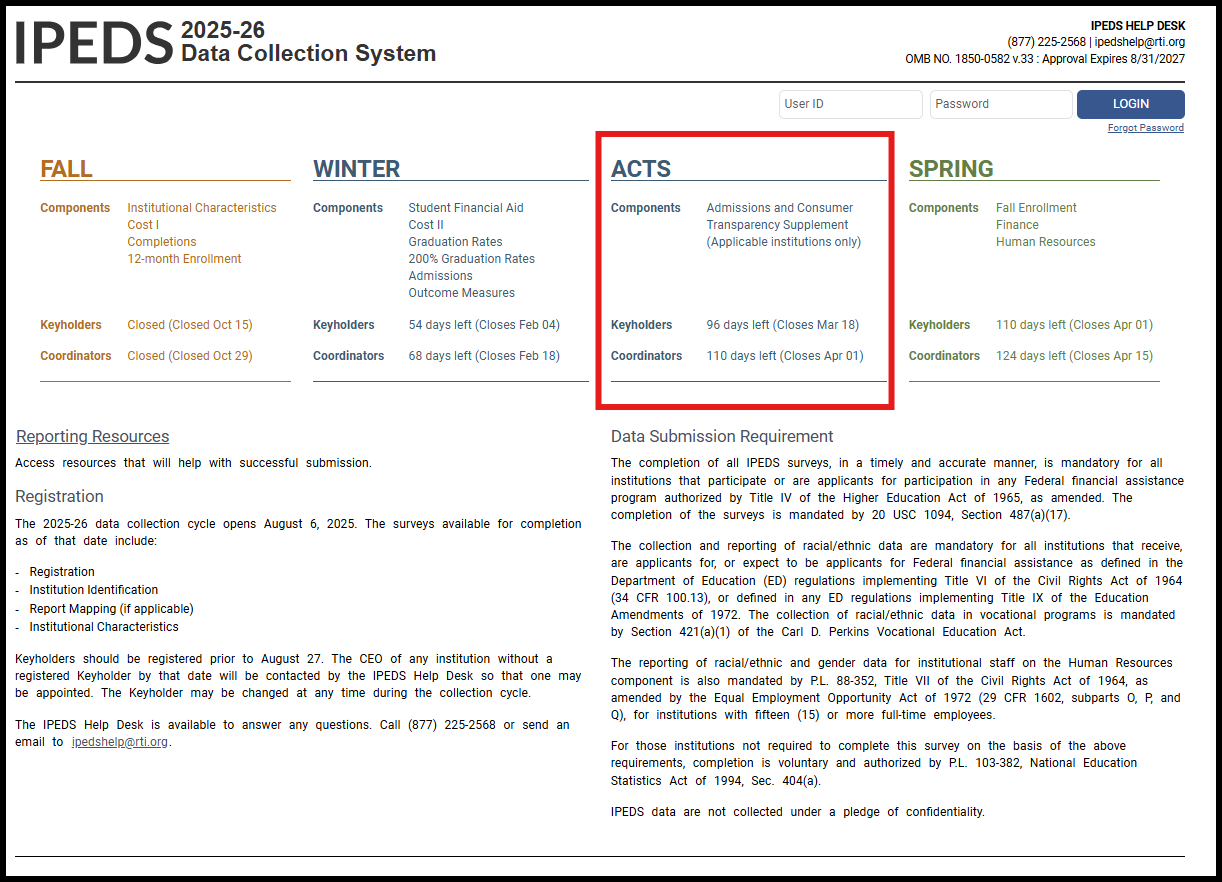
Upon logging in, eligible respondents will see an indication as to whether the ACTS requirement has been met (along with the other IPEDS survey requirements)
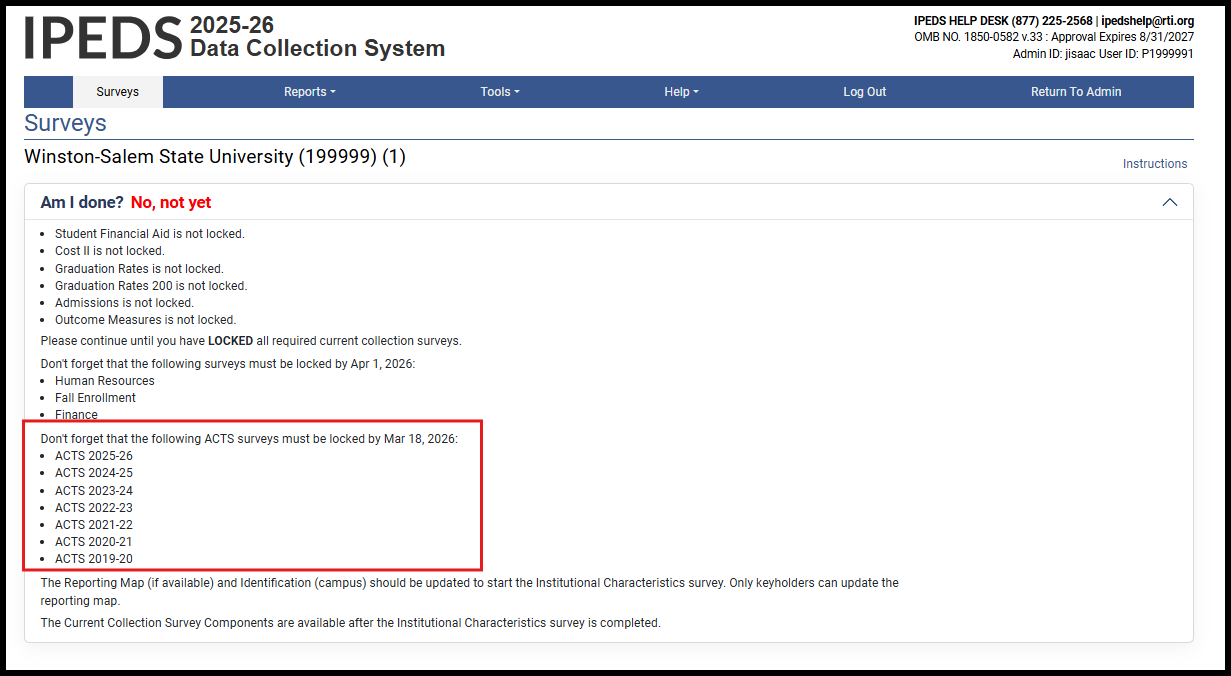
The respondent institution’s list of required surveys will display all ACTS data academic years.
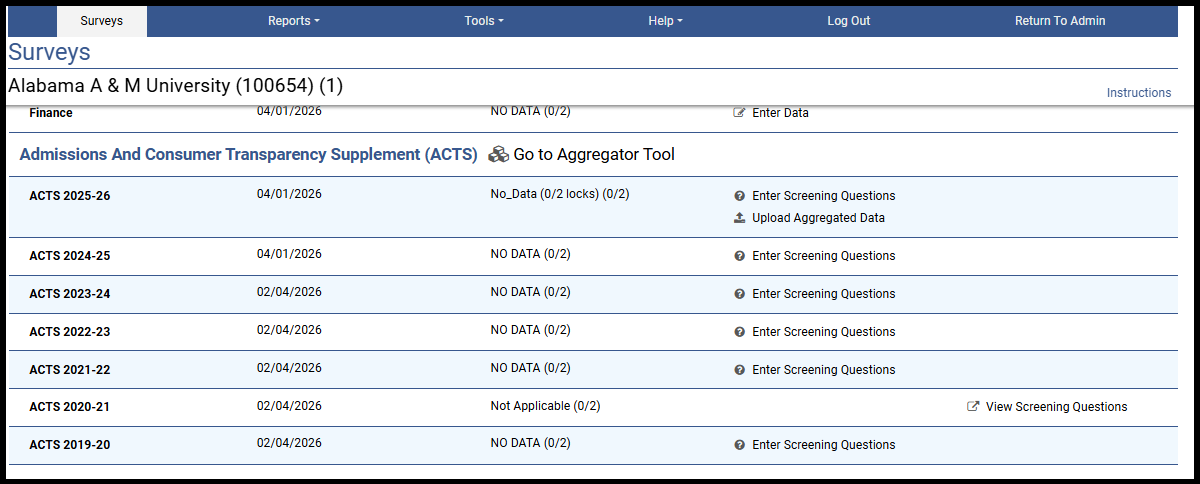
When the respondent selects any of the data years shown above, they will be required to complete a set of screening questions to determine if the reporting requirements apply for the AY in question.

Screening Questions are required for each of the academic years, and will appear as shown here:
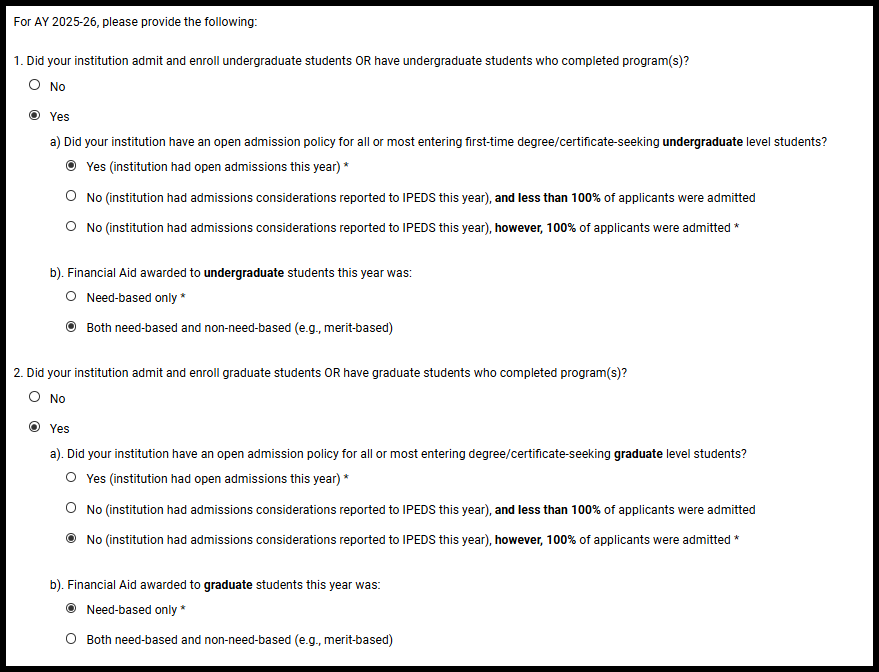
The results of the screening questions will determine which data are required and will be displayed in a table which the respondent must confirm before proceeding.
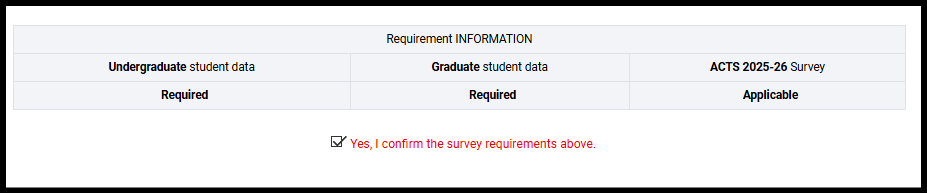
Once the Screening Questions are completed, the status for the specific data year will be updated in the DCS survey screen, and the upload link made available:

If, for any given academic year, the screening questions determine that data are not required, the academic year will be made Not Applicable and displayed to the respondent as follow:

To prepare Aggregated Data file(s) for upload, the respondent clicks on the link for the Aggregator Tool. The respondent’s permissions will be passed to the site where the Aggregator Tool is located, automatically logging them in. Note: Multiple users at any given institution can be granted permission to access the aggregator tool, and permissions are managed by the IPEDS keyholder through the Data Collection System (as is the case with all IPEDS survey components).
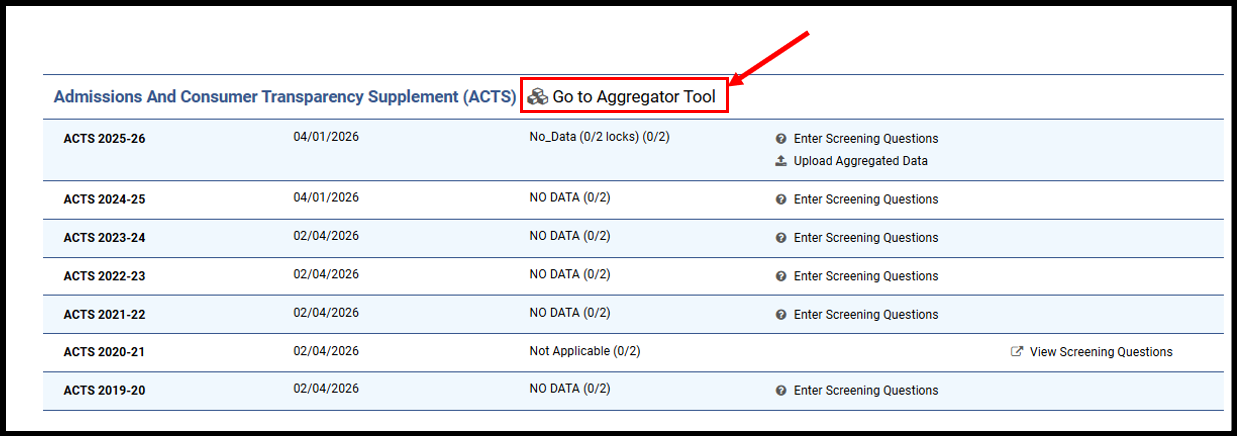
A new window will open and the Aggregator Tool site will be loaded. Screenshots of the Tool site, and the full text, appear below.
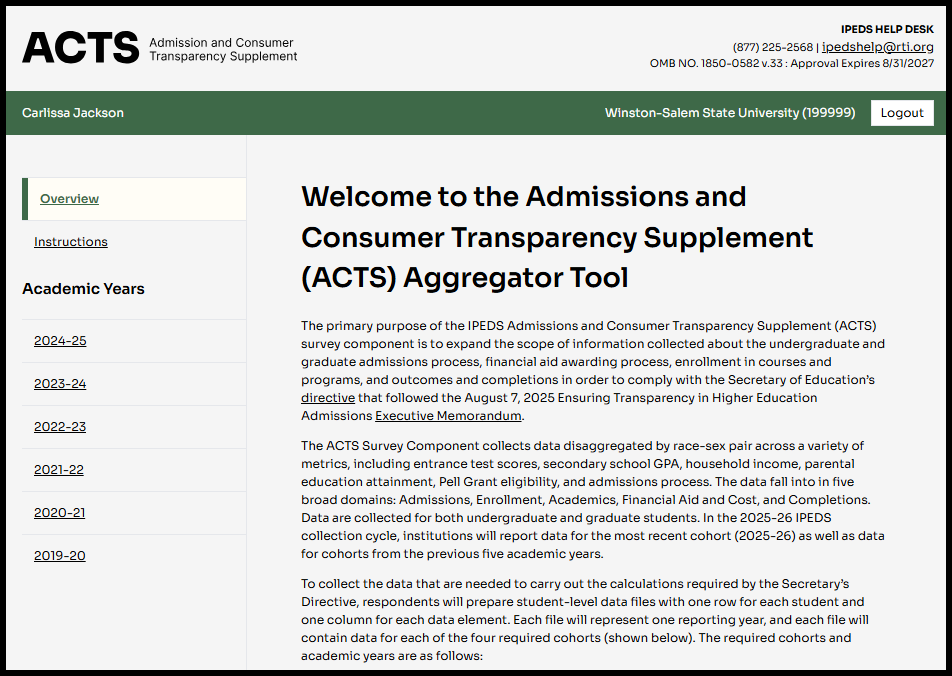
Welcome to the Admissions and Consumer Transparency Supplement (ACTS) Survey Component Portal
Overview
The primary purpose of the IPEDS Admissions and Consumer Transparency Supplement (ACTS) survey component is to expand the scope of information collected about the undergraduate and graduate admissions process, financial aid awarding process, enrollment in courses and programs, and outcomes and completions in order to comply with the Secretary of Education’s directive that followed the August 7, 2025 Ensuring Transparency in Higher Education Admissions Executive Memorandum.
The ACTS Survey Component collects data disaggregated by race/ethnicity-sex pair across a variety of metrics, including entrance test scores, secondary school GPA, household income, parental education attainment, Pell Grant eligibility, and admissions process. The data fall into in five broad domains: Admissions, Enrollment, Academics, Financial Aid and Cost, and Completions. Data are collected for both undergraduate and graduate students. In the 2025-26 IPEDS collection cycle, institutions will report data for the most recent cohort (2025-26) as well as data for cohorts from the previous five academic years.
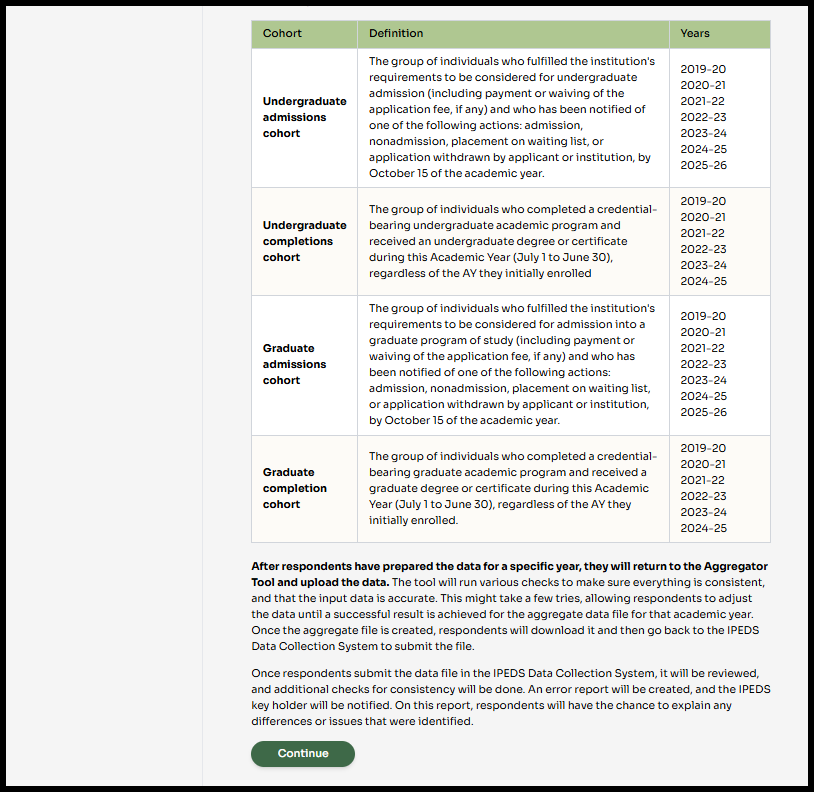
To collect the data that are needed to carry out the calculations required by the Secretary’s Directive, respondents will prepare student-level data files with one row for each student and one column for each data element. Each file will represent one reporting year, and each file will contain data for each of the four required cohorts (shown below). The required cohorts and academic years are as follows:
Cohort |
Definition |
Years |
Undergraduate admissions cohort |
The group of individuals who fulfilled the institution's requirements to be considered for undergraduate admission (including payment or waiving of the application fee, if any) and who has been notified of one of the following actions: admission, nonadmission, placement on waiting list, or application withdrawn by applicant or institution, by October 15 of the academic year. |
2019-20 2020-21 2021-22 2022-23 2023-24 2024-25 2025-26 |
Undergraduate completions cohort |
The group of individuals who completed a credential-bearing undergraduate academic program and received an undergraduate degree or certificate during this Academic Year (July 1 to June 30), regardless of the AY they initially enrolled. |
2019-20 2020-21 2021-22 2022-23 2023-24 2024-25 |
Graduate admissions cohort |
The group of individuals who fulfilled the institution's requirements to be considered for admission into a graduate program of study (including payment or waiving of the application fee, if any) and who has been notified of one of the following actions: admission, nonadmission, placement on waiting list, or application withdrawn by applicant or institution, by October 15 of the academic year. |
2019-20 2020-21 2021-22 2022-23 2023-24 2024-25 2025-26 |
Graduate completions cohort |
The group of individuals who completed a credential-bearing graduate academic program and received a graduate degree or certificate during this Academic Year (July 1 to June 30), regardless of the AY they initially enrolled. |
2019-20 2020-21 2021-22 2022-23 2023-24 2024-25 |
After respondents have prepared the data for a specific year, they will return to the Aggregator Tool and upload the data. The tool will run various checks to make sure everything is consistent, and that the input data is accurate. This might take a few tries, allowing respondents to adjust the data until a successful result is achieved for the aggregate data file for that academic year. Once the aggregate file is created, respondents will download it and then go back to the IPEDS Data Collection System to submit the file.
Once respondents submit the data file in the IPEDS Data Collection System, it will be reviewed, and additional checks for consistency will be done. An error report will be created, and the IPEDS key holder will be notified. On this report, respondents will have the chance to explain any differences or issues that were identified.
The instructions page contained within the ACTS Aggregator tool appears as follows, with the full-text appearing below:
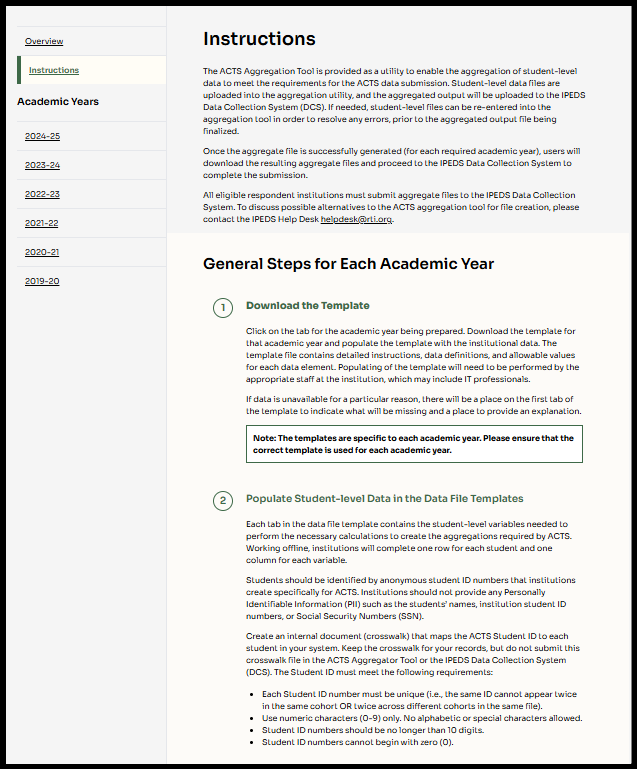
Instructions
The ACTS Aggregation Tool is provided as a utility to enable the aggregation of student-level data to meet the requirements for the ACTS data submission. Student-level data files are uploaded into the aggregation utility, and the aggregated output will be uploaded to the IPEDS Data Collection System (DCS). If needed, student-level files can be re-entered into the aggregation tool in order to resolve any errors, prior to the aggregated output file being finalized.
Once the aggregate file is successfully generated (for each required academic year), users will download the resulting aggregate files and proceed to the IPEDS Data Collection System to complete the submission.
All eligible respondent institutions must submit aggregate files to the IPEDS Data Collection System. To discuss possible alternatives to the ACTS aggregation tool for file creation, please contact the IPEDS Help Desk helpdesk@rti.org.
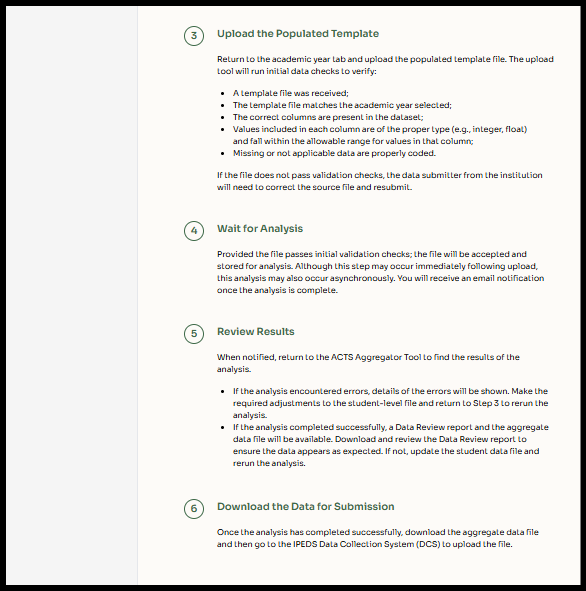
Below are the steps for preparing and submitting the aggregate files that will meet the requirements for the ACTS data submission:
1. Download the Template: Click on the tab for the academic year being prepared. Download the template for that academic year and populate the template with the institutional data. The template file contains detailed instructions, data definitions, and allowable values for each data element. Populating of the template will need to be performed by the appropriate staff at the institution, which may include IT professionals.
If data is unavailable for a particular reason, there will be a place on the first tab of the template to indicate what will be missing and a place to provide an explanation.
Note: The templates are specific to each academic year. Please ensure that the correct template is used for each academic year.
2. Populate student-level data in the data file templates
Each tab in the data file template contains the student-level variables needed to perform the necessary calculations to create the aggregations required by ACTS. Working offline, institutions will complete one row for each student and one column for each variable.
Students should be identified by anonymous student ID numbers that institutions create specifically for ACTS. Institutions should not provide any Personally Identifiable Information (PII) such as the students’ names, institution student ID numbers, or Social Security Numbers (SSN).
Create an internal document (crosswalk) that maps the ACTS Student ID to each student in your system. Keep the crosswalk for your records, but do not submit this crosswalk file in the ACTS Aggregator Tool or the IPEDS Data Collection System (DCS). The Student ID must meet the following requirements:
Each Student ID number must be unique (i.e., the same ID cannot appear twice in the same cohort OR twice across different cohorts in the same file).
Use numeric characters (0-9) only. No alphabetic or special characters allowed.
Student ID numbers should be no longer than 10 digits.
Student ID numbers cannot begin with zero (0).
3. Upload the Populated Template: Return to the academic year tab and upload the populated template file. The upload tool will run initial data checks to verify:
A template file was received;
The template file matches the academic year selected;
The correct columns are present in the dataset;
Values included in each column are of the proper type (e.g., integer, float) and fall within the allowable range for values in that column;
Missing or not applicable data are properly coded.
[additional checks may be added]
If the file does not pass validation checks, the data submitter from the institution will need to correct the source file and resubmit.
4. Wait for Analysis: Provided the file passes initial validation checks; the file will be accepted and stored for analysis. Although this step may occur immediately following upload, this analysis may also occur asynchronously. You will receive an email notification once the analysis is complete.
5. Review Results: When notified, return to the ACTS Aggregator Tool to find the results of the analysis.
If the analysis encountered errors, details of the errors will be shown. Make the required adjustments to the student-level file and return to Step 2 to rerun the analysis.
If the analysis completed successfully, a Data Review Report and the aggregate data file will be available. Download and review the Data Review Report to ensure the data appears as expected. If not, update the student data file and rerun the analysis.
6. Download the Data for Submission: Once the analysis has completed successfully, download the aggregate data file and then go to the IPEDS Data Collection System (DCS) to upload the file.
The respondent then selects the data year (AY) for which they are uploading data. The template available is specific to the AY being provided. A screenshot and the full-text of the site appears below each image.
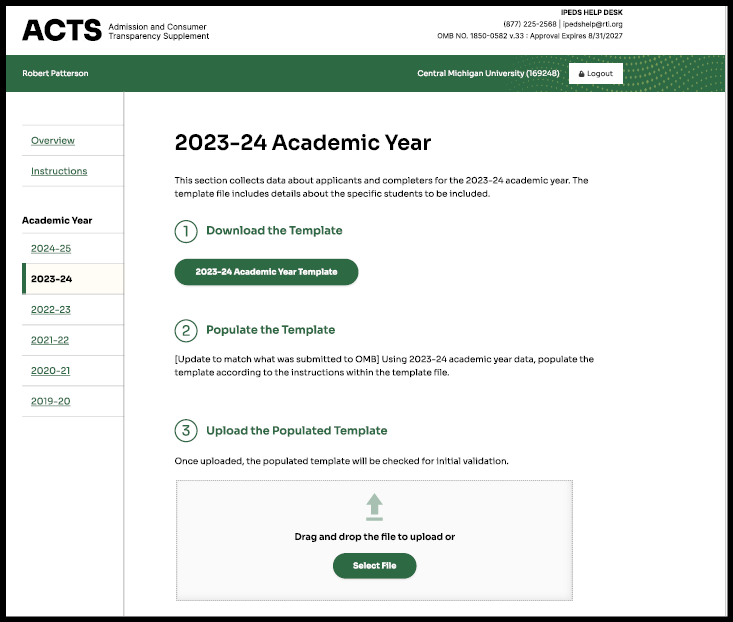
[20XX-XX] Academic Year
This section collects data about applicants and completers for the 20xx-xx academic year. The template file includes details about the specific students to be included.
1. Download the Template: Download the template below. Follow the directions in the template for how to populate your data.
[20XX-XX] Academic Year Template
2. Populate student-level data in the data file templates
Each tab in the data file template contains the student-level variables needed to perform the necessary calculations to create the aggregations required by ACTS. Working offline, complete one row for each student and one column for each variable.
Students should be identified by anonymous student ID numbers that institutions create specifically for ACTS. Institutions should not provide any Personally Identifiable Information (PII) such as the students’ names, institution student ID numbers, or Social Security Numbers (SSN).
Create an internal document (crosswalk) that maps the ACTS Student ID to each student in your system. Keep the crosswalk for your records, but do not submit this crosswalk file in the ACTS Aggregator Tool or the IPEDS Data Collection System (DCS). The Student ID must meet the following requirements:
Each Student ID number must be unique (i.e., the same ID cannot appear twice in the same cohort OR twice across different cohorts in the same file).
Use numeric characters (0-9) only. No alphabetic or special characters allowed.
Student ID numbers should be no longer than 10 digits.
Student ID numbers cannot begin with zero (0).
3. Upload the Populated Template: Upload the completed populated template. Initial checks will be completed to ensure the template is formatted correctly and ready for processing.
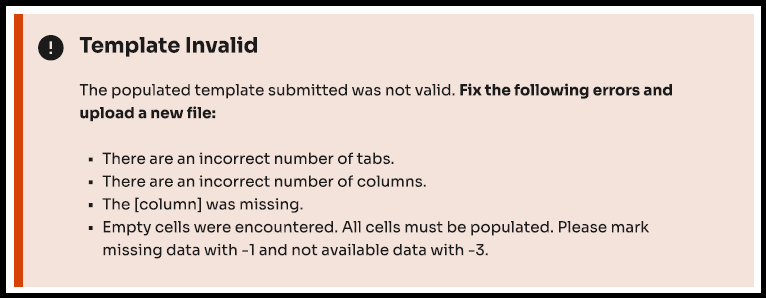
[if template does not pass validation checks, display:
Template Invalid The populated template you submitted was not valid. The following errors were encountered:
Please correct these errors in your template and reupload. |
else: blank]
Upload populated template
-
Click to select file
Begin Upload
After completing the template for the desired AY, the respondent returned to the Aggregator Tool and uploads the file. During the upload process, the Aggregator checks/verifies file formatting, runs Python programming which calculates quintiles and averages based on the student records, calculates all necessary disaggregations required by ED, and outputs 1) a .csv file with the final aggregate data file, 2) an error report indicating any possible formatting issues or missing data issues, and 3) a Data Review Report providing frequencies of various data measures (Note: the Data Review Report is intended to enable respondents to determine if the data appear to be complete and as expected. If the report indicates anomalies such as lower than expected numbers of records or average data values that are unexpected, the respondent may wish to review their template and re-upload if mistakes or data omissions are found).
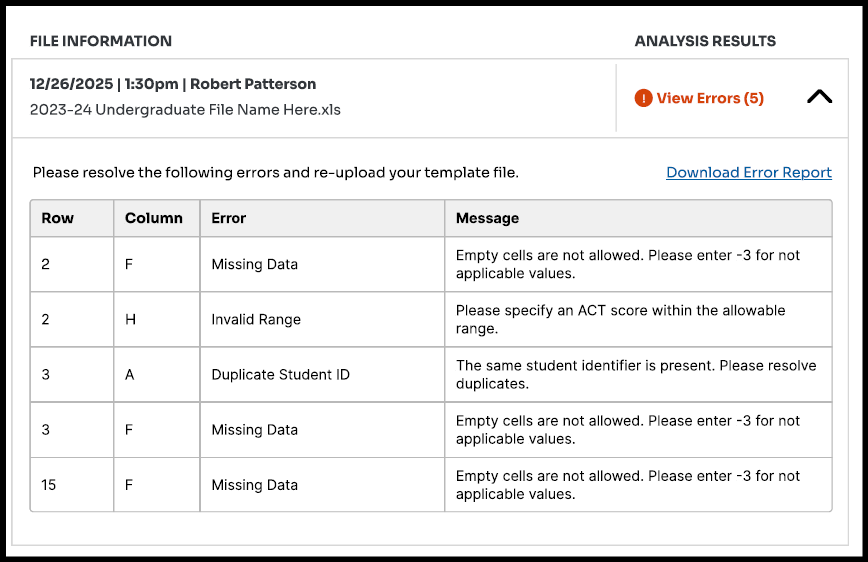
Following are screenshots of the processing page, along with example error messages and confirmation messages that will be displayed as appropriate during the processing stage.
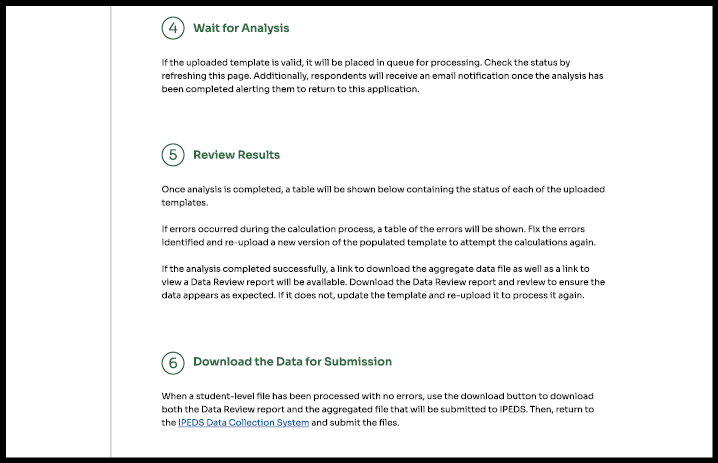



4. Wait for Analysis: If the uploaded template is valid, it will be placed in queue for processing. Check the status by refreshing this page. Additionally, respondents will receive an email notification once the analysis has been completed alerting them to return to this application.
[if processing:
[File Processing: The file uploaded at [timestamp] is still processing. An email will be sent when processing is complete.]
[if processed but errors:
[File Processing Complete: The file has been processed, however, errors were discovered. Review the errors below and re-submit.]
[If processed successfully:
[File Processing Complete: the file has been processed successfully. Please review the Data Review Report and download the data to submit in IPEDS DCS].
5. Review Results: Below is a table containing the status of each of the uploaded templates.
If errors occurred during the calculation process, a table of the errors will be shown. Fix the errors identified and re-upload a new version of the populated template to attempt the analysis again.
If the analysis completed successfully, a link to download the Data Review Report as well as the aggregate data file will be available. Download the Data Review Report and review to ensure the data appears as expected. If it does not, update the template and re-upload it to process it again.
[date and timestamp of attempt] |
[status: success or errors] |
[View Data Review Report link] |
[Download aggregate file link] |
[if errors, display:
Please resolve the following errors and re-upload your template file:
Row |
Column |
Error |
Message |
[row number] |
[column number] |
[error type] |
[error message] |
else: blank]
6. Download the Data for Submission. When a student-level file has been processed with no errors, download the aggregated file. Then, return to the IPEDS Data Collection System and submit the aggregated file.
After downloading the files from the Aggregator Tool, the respondent returns to the IPEDS Data Collection System and uploads the file(s) needed.

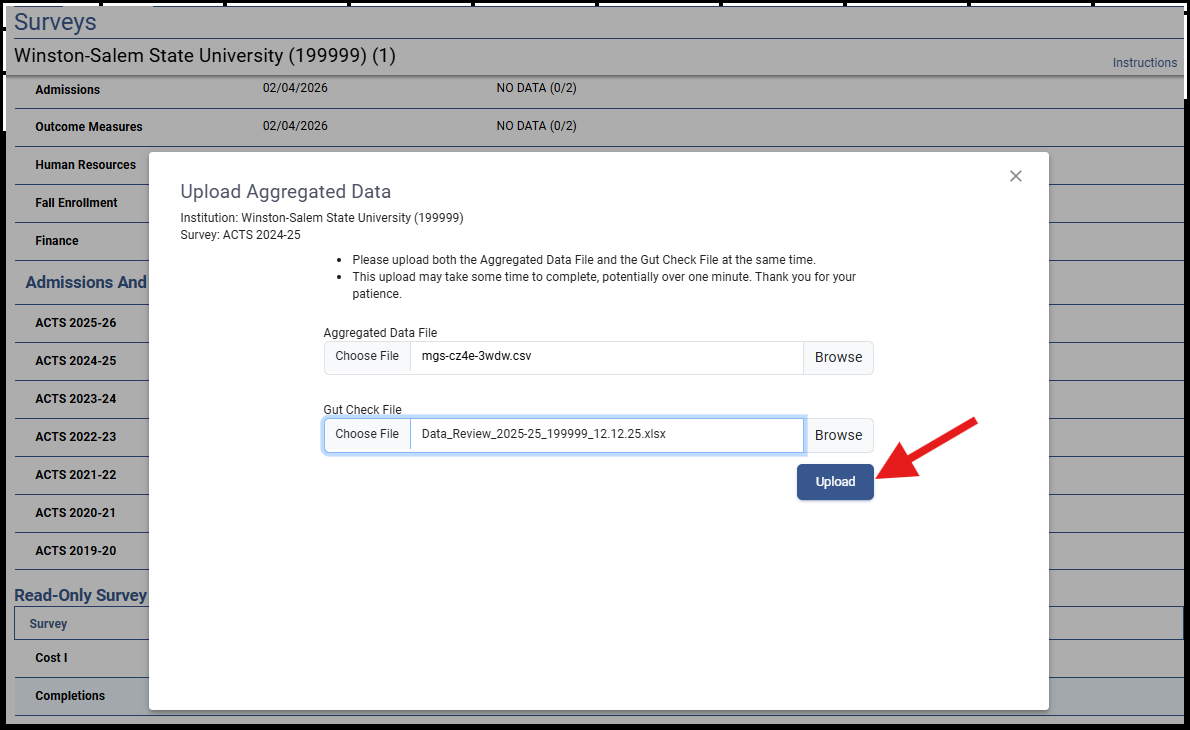
Within the Data Collection System, the status of each academic data year will progress through a set of stages such as the following:
NO DATA
Screening questions not yet answered.
No Data
Screening questions completed, but no data yet provided.
Has Data
Data file has been uploaded, but no edit checks yet performed.
Edited
Edit checks have been performed but errors are not yet resolved.
Pending Review
Edit checks have been resolved, and the file is awaiting secondary QC review by RTI.
Locked
Secondary QC checks (if any) have been resolved, and the data have been submitted by the keyholder. If there are no locking coordinators, the status will become Complete at this point.
Completed
In cases where the institution has one or more locking coordinators, this status indicates that all locks have been applied by the keyholder and the locking coordinator(s).
An institution will have completed its ACTS reporting requirements when all of the Academic Years show either Locked, Complete, or Not Applicable. In addition, the Am I Done? Will indicate YES.

C. Student-Level File Instructions and Codebook
Description: There will be a Microsoft Excel template file for each academic year for which data are required. The file will contain 9 tabs: a general instructions tab; four data entry tabs (one each for the undergraduate admissions cohort, undergraduate completions cohort, graduate admissions cohort, and the graduate completions cohort); and four codebook tabs (one for each data entry tab). The general instructions and the codebooks for each cohort (using the 2019-20 year as an exemplar) are shown below.
General Instructions
IPEDS Admissions and Consumer Transparency Supplement (ACTS) Template: Academic Year 2019-2020 |
|||
|
|
|
|
Instructions for using this template |
|||
This template collects de-identified student-level data for the ACTS supplement. Each template file corresponds to undergraduate and graduate admissions and completions cohorts from the specified academic year. Your data must be provided following the formats in this template to read correctly into the aggregation program in the ACTS system. If you are unable to provide data for an entire cohort (tab) of this file, you must indicate this in the table below and provide the reason the data will not be provided. Please review these instructions and provide the requested data elements for each student in each of the four cohorts accordingly. |
|||
|
|
|
|
Cohort Definitions |
|
|
|
There
are four tabs in this file, each of which corresponds to a
specific cohort. They are: |
|||
|
|
|
|
Indicate
whether you are able to provide the data for the following
cohorts for the 2019-2020 academic year.
|
|||
|
|
|
|
Cohort |
Able to provide? |
If No, please explain: |
|
Undergraduate
Admissions |
Yes |
|
|
Undergraduate
Completions |
Yes |
|
|
Graduate
Admissions |
Yes |
|
|
Graduate
Completions |
Yes |
|
|
|
|
|
|
Please
provide additional information on other missing data |
|||
|
|||
|
|||
|
|
|
|
Assigning Student ID values |
|
|
|
The
data provided in this template MUST be deidentified. Please DO
NOT provide any Personally Identifiable Information (PII), such
as Name, Institution Student ID, Social Security Number, locating
information, etc. |
|||
|
|||
Using the Codebook |
|
|
|
Before
adding data to the template, you will need to transform your data
to align with the numeric codes described on the relevant
Codebook tab. Each cohort tab has its own codebook; string
(alphabetical or alpha-numeric) values and numeric values not
listed in the codebook will not be accepted by the ACTS system.
Consult the "Option Set" column in each codebook for
the acceptable values. |
|||
|
|||
If you need help |
|
|
|
If you have questions or need further assistance, please contact the IPEDS Help Desk at ipedshelp@rti.org or 877-225-2568. |
|||
Undergraduate Admissions Codebook
ACTS Data Codebook: 2019-2020 Undergraduate Admissions Include all first-time degree/certificate-seeking undergraduate applicants who fulfilled all requirements for consideration for Fall 2019 admission (including payment or waiving of the application fee, if any) and who have been notified of one of the following actions: admission, non-admission, placement on a wait list, or application withdrawn (by applicant or institution). • Institutions operating on a traditional academic year calendar (semester, trimester, quarter, or 4-1-4) should include all students who applied for enrollment if they would have been considered first-time degree/certificate-seeking undergraduate students as of the institution's official fall reporting date, or October 15. • Institutions operating on a calendar that differs by program or that enrolls students on a continuous basis (referred to as program reporters) should include all students who applied for enrollment if they would have been considered first-time degree/certificate-seeking undergraduate students any time during the period of August 1 through October 31.
INCLUDE applicants who applied for Fall 2019 admission but deferred enrollment to a later academic year. DO NOT INCLUDE transfer-in students or any applicants who would not be considered first-time degree/certificate-seeking students if enrolled. See
the Cohort Definitions section on the Instructions tab for
definitions for first-time and degree/certificate-seeking. Reminders About Reporting Persons by Racial/Ethnic Category (1997 OMB) This information is being collected in compliance with Title VI of the Civil Rights Act of 1964 and Title IX of the Education Amendments of 1972 and Sec. 421(a)(1) of the Carl D. Perkins Vocational Education Act. These instructions correspond with the Final Guidance on Maintaining, Collecting, and Reporting Racial and Ethnic Data to the U.S. Department of Education, published in the Federal Register on October 19, 2007.
Method of collection: Institutions must collect race and ethnicity information using a 2-question format. The first question is whether the respondent is Hispanic/Latino. The second question is whether the respondent is from one or more races from the following list: American Indian or Alaska Native, Asian, Black or African American, Native Hawaiian or Other Pacific Islander, and White. Institutions should allow students and staff to self-identify their race and ethnicity. For further details on the guidance for collecting these data, please see the full Federal Register notice.
Method of reporting aggregate data: Institutions must report aggregate data to the U.S. Department of Education using the NINE categories below. Racial/ethnic designations are requested only for United States citizens, residents, and other eligible non-citizens. Eligible noncitizens include all students who completed high school or a GED equivalency within the United States (including DACA and undocumented students) and who were not on an F-1 non-immigrant student visa at the time of high school graduation. More information about other eligible (for financial aid purposes) non-citizens is available at https://studentaid.gov/understand-aid/eligibility/requirements/non-us-citizens.
For Non-Hispanic/Latino individuals:
In addition, the following categories may be used:
Racial/ethnic descriptions: Racial/ethnic designations as used in this survey do not denote scientific definitions of anthropological origins. The categories are:
Other descriptive categories
pplicants who were not admitted, admitted students who did not enroll, and students who are not first-time, full-time, degree/certificate-seeking should be assigned a -3 for not applicable. |
Item |
Data Element |
Section |
Valid Values |
Applies to |
Variable definition |
Instructions |
|
1 |
Student ID |
ID |
Unique numeric value |
All first-time degree/certificate-seeking undergraduate applicants, where an applicant is an individual who has fulfilled the institution's requirements to be considered for Fall 2019 admission as described in the cohort definition at the top of this tab. |
A unique numeric identifier value for each student in the data. |
These
data MUST be deidentified. Assign a unique numeric ID to each
student and maintain a crosswalk in your documentation files. Do
not submit the crosswalk. If you are submitting data for Graduate
students, ensure that there are no duplicate values across the
Undergraduate AND Graduate data. |
|
2 |
Race/ethnicity |
Demographics |
1:
U.S. Nonresident |
All first-time degree/certificate-seeking undergraduate applicants, where an applicant is an individual who has fulfilled the institution's requirements to be considered for Fall 2019 admission as described in the cohort definition at the top of this tab.
|
Racial/ethnic
designations as used in this survey do not denote scientific
definitions of anthropological origins. The categories are as
follows: |
Enter
a value from the list of valid values. |
|
|
|||||||
3 |
Sex |
Demographics |
0:
Male |
All first-time degree/certificate-seeking undergraduate applicants, where an applicant is an individual who has fulfilled the institution's requirements to be considered for Fall 2019 admission as described in the cohort definition at the top of this tab. |
Student sex. |
Enter
a value from the list of valid values. |
|
4 |
Admission status |
Admissions |
0:
Not Admitted |
All first-time degree/certificate-seeking undergraduate applicants, where an applicant is an individual who has fulfilled the institution's requirements to be considered for Fall 2019 admission as described in the cohort definition at the top of this tab. |
An indication of whether an applicant has been granted an official offer to enroll in a postsecondary institution. |
Enter a value from the list of valid values. |
|
5 |
Admissions process used |
Admissions |
1:
Early Action |
Admitted students, where admitted students are first-time degree/certificate-seeking applicants that have been granted an official offer to enroll in a postsecondary institution. |
Definitions
of these processes are: |
Enter
a value from the list of valid values. |
|
6 |
Enrollment status |
Admissions |
0:
Not Enrolled |
Admitted students, where admitted students are first-time degree/certificate-seeking applicants that have been granted an official offer to enroll in a postsecondary institution. |
An indication of whether an admitted first-time degree/certificate-seeking applicant enrolled in the postsecondary institution. |
Enter
a value from the list of valid values. |
|
7 |
Full-time |
Enrolled Students |
0:
Not full-time |
All enrolled first-time degree/credential-seeking students (students where Enrollment Status = 1). |
An indication of whether the student is full-time as of the Fall 2019 term. A full-time student is enrolled for 12 or more semester credits, or 12 or more quarter credits, or 24 or more clock hours a week each term. |
Enter
a value from the list of valid values. |
|
8 |
Bachelor's or equivalent-seeking subcohort |
Enrolled Students |
0:
No |
All enrolled first-time degree/credential-seeking students who are also full-time (students where Full-time = 1). |
Whether the student is part of the subcohort of enrolled first-time/full-time degree/credential-seeking students who were seeking a bachelor's or equivalent degree upon entry. |
Enter
a value from the list of valid values. |
|
9 |
SAT Math score |
Secondary School Record |
200-800 |
All first-time degree/certificate-seeking undergraduate applicants, where an applicant is an individual who has fulfilled the institution's requirements to be considered for Fall 2019 admission as described in the cohort definition at the top of this tab. |
The applicant's score on the Math portion of the SAT, previously known as the Scholastic Aptitude Test, this is an examination used to predict the facility with which an individual will progress in learning college-level academic subjects. |
Enter
a numeric value between 200 and 800. |
|
10 |
SAT Reading and Writing score |
Secondary School Record |
200-800 |
All first-time degree/certificate-seeking undergraduate applicants, where an applicant is an individual who has fulfilled the institution's requirements to be considered for Fall 2019 admission as described in the cohort definition at the top of this tab. |
The applicant's score on the Reading portion of the SAT, previously known as the Scholastic Aptitude Test, this is an examination used to predict the facility with which an individual will progress in learning college-level academic subjects. |
Enter
a numeric value between 200 and 800. |
|
11 |
SAT overall score |
Secondary School Record |
400-1600 |
All first-time degree/certificate-seeking undergraduate applicants, where an applicant is an individual who has fulfilled the institution's requirements to be considered for Fall 2019 admission as described in the cohort definition at the top of this tab. |
The sum of the Math and Reading scores on the SAT, previously known as the Scholastic Aptitude Test, this is an examination used to predict the facility with which an individual will progress in learning college-level academic subjects. |
Enter
a numeric value between 400 and 1600. |
|
12 |
ACT Math score |
Secondary School Record |
1-36 |
All first-time degree/certificate-seeking undergraduate applicants, where an applicant is an individual who has fulfilled the institution's requirements to be considered for Fall 2019 admission as described in the cohort definition at the top of this tab. |
The applicant's score on the math section of the ACT, previously known as the American College Testing program, measures educational development and readiness to pursue college-level coursework in English, mathematics, natural science, and social studies. Student performance does not reflect innate ability and is influenced by a student's educational preparedness. |
Enter
a numeric value between 1 and 36. |
|
13 |
ACT English score |
Secondary School Record |
1-36 |
All first-time degree/certificate-seeking undergraduate applicants, where an applicant is an individual who has fulfilled the institution's requirements to be considered for Fall 2019 admission as described in the cohort definition at the top of this tab. |
The applicant's score on the English section of the ACT, previously known as the American College Testing program, measures educational development and readiness to pursue college-level coursework in English, mathematics, natural science, and social studies. Student performance does not reflect innate ability and is influenced by a student's educational preparedness. |
Enter
a numeric value between 1 and 36. |
|
14 |
ACT Composite score |
Secondary School Record |
1-36 |
All first-time degree/certificate-seeking undergraduate applicants, where an applicant is an individual who has fulfilled the institution's requirements to be considered for Fall 2019 admission as described in the cohort definition at the top of this tab. |
The applicant's composite score on the ACT, previously known as the American College Testing program, measures educational development and readiness to pursue college-level coursework in English, mathematics, natural science, and social studies. Student performance does not reflect innate ability and is influenced by a student's educational preparedness. |
Enter
a numeric value between 1 and 36. |
|
15 |
Unweighted secondary school GPA |
Secondary School Record |
0.00-4.00 |
All first-time degree/certificate-seeking undergraduate applicants, where an applicant is an individual who has fulfilled the institution's requirements to be considered for Fall 2019 admission as described in the cohort definition at the top of this tab. |
A student’s grade point average on a standard 4.0 scale, where A=4, B=3, C=2, D=1, and F=0, without giving extra grade points for difficult courses such as honors or Advanced Placement courses. |
Enter
a numeric value between 0.00 and 4.00. |
|
16 |
Family Income Band |
Family Characteristics |
1: $0-$30,000 2: $30,001-$58,000 3: $58,001-$94,000 4: $94,001 - $153,000 5:
$153,001+ |
All first-time degree/certificate-seeking undergraduate applicants, where an applicant is an individual who has fulfilled the institution's requirements to be considered for Fall 2019 admission as described in the cohort definition at the top of this tab. |
A categorical indicator of family income.
For
dependent students this should include the parents’ adjusted
gross income and the student’s adjusted gross income. For
independent students this should include the student’s
adjusted gross income. |
Enter
a value from the list of valid values. |
|
17 |
Financial aid status |
Family Characteristics |
0:
Unaided Student |
All enrolled first-time degree/credential-seeking students who are also full-time (students where Full-time = 1). |
Whether
a student receives any type of financial aid, defined as:
|
Enter
a value from the list of valid values. |
|
18 |
Pell grant eligibility |
Family Characteristics |
0:
Not Eligible for Pell Grant program |
All enrolled first-time degree/credential-seeking students who are also full-time (students where Full-time = 1). |
Whether
a student is eligible for the Pell Grant program, defined
as: |
Enter
a value from the list of valid values. |
|
19 |
Parental college attainment |
Family Characteristics |
0:
Parent(s) did not complete college |
All enrolled first-time degree/credential-seeking students who are also full-time (students where Full-time = 1). |
Whether
a student's parent(s) completed college. College refers to any
type of education beyond high school or secondary school,
including community college, university, career or trade school,
and international universities. Include any type of postsecondary
credential (e.g., diploma, certificate, or degree). |
Enter
a value from the list of valid values. |
|
20 |
Unweighted cumulative GPA after first academic year |
First Year Academics |
0.00-4.00
|
All enrolled first-time degree/credential-seeking students who are also full-time (students where Full-time = 1). |
A student’s grade point average on a standard 4.00 scale (where A=4, B=3, C=2, D=1, and F=0) without giving extra grade points for course difficulty, cumulative after the student's first academic year at the postsecondary institution. |
Enter
a numeric value between 0.00 and 4.00. |
|
21 |
Remedial course taking |
First Year Academics |
0:
No Remedial courses taken |
All enrolled first-time degree/credential-seeking students who are also full-time (students where Full-time = 1). |
Whether
a student took one or more remedial courses in the first term of
their first year. A remedial course is defined as: |
Enter
a value from the list of valid values. |
|
22 |
Continuing education course taking |
First Year Academics |
0:
No Continuing Ed courses taken |
All enrolled first-time degree/credential-seeking students who are also full-time (students where Full-time = 1). |
Whether
a student took one or more continuing education courses in the
first term of their first year. A continuing education course is
defined as: |
Enter
a value from the list of valid values. |
|
23 |
Tuition and fees |
Cost |
Numeric
value, expressed in US Dollars ($) OR |
All enrolled first-time degree/credential-seeking students who are also full-time (students where Full-time = 1). |
The amount of tuition and required fees covering a full academic year charged to this student. These values may not be the same for all students at an institution. Required fees include all fixed sum charges that are required of such a large proportion of all students that the student who does not pay the charges is an exception. |
Enter
a numeric value with no decimals, commas, or dollar signs. Round
values with decimals to the nearest whole number. |
|
24 |
Amount of need-based institutional grant aid AWARDED |
Financial Aid |
Numeric
value, expressed in US Dollars ($) OR |
All enrolled first-time degree/credential-seeking students who are also full-time (students where Full-time = 1). |
The
amount of need-based institutional grant aid awarded to the
student, defined as: |
Enter
a numeric value with no decimals, commas, or dollar signs. Round
values with decimals to the nearest whole number. |
|
25 |
Amount of need-based institutional grant aid RECEIVED |
Financial Aid |
Numeric
value, expressed in US Dollars ($) OR |
All enrolled first-time degree/credential-seeking students who are also full-time (students where Full-time = 1). |
The
amount of need-based institutional grant aid received by the
student, defined as: |
Enter
a numeric value with no decimals, commas, or dollar signs. Round
values with decimals to the nearest whole number. |
|
26 |
Amount of non-need-based institutional grant aid AWARDED |
Financial Aid |
Numeric
value, expressed in US Dollars ($) OR |
All enrolled first-time degree/credential-seeking students who are also full-time (students where Full-time = 1). |
The
amount of institutional grant aid awarded to the student that were
NOT based on the financial need of the student, as determined by
your financial aid office. Institutional grants are defined
as: |
Enter
a numeric value with no decimals, commas, or dollar signs. Round
values with decimals to the nearest whole number. |
|
27 |
Amount of non-need-based institutional grant aid RECEIVED |
Financial Aid |
Numeric
value, expressed in US Dollars ($) OR |
All enrolled first-time degree/credential-seeking students who are also full-time (students where Full-time = 1). |
The
amount of institutional grant aid received by the student that
were NOT based on the financial need of the student, as determined
by your financial aid office. Institutional grants are defined
as: |
Enter
a numeric value with no decimals, commas, or dollar signs. Round
values with decimals to the nearest whole number. |
|
28 |
Amount of local, state, or federal grant aid AWARDED |
Financial Aid |
Numeric
value, expressed in US Dollars ($) OR |
All enrolled first-time degree/credential-seeking students who are also full-time (students where Full-time = 1). |
The
sum of state and local grants and federal grants awarded
to the student. State and local grants are defined as: |
Enter
a numeric value with no decimals, commas, or dollar signs. Round
values with decimals to the nearest whole number. |
|
29 |
Amount of local, state, or federal grant aid RECEIVED |
Financial Aid |
Numeric
value, expressed in US Dollars ($) OR |
All enrolled first-time degree/credential-seeking students who are also full-time (students where Full-time = 1). |
The
sum of state and local grants and federal grants
received by
the student. State and local grants are defined as: |
Enter
a numeric value with no decimals, commas, or dollar signs. Round
values with decimals to the nearest whole number. |
|
30 |
Completion Date |
Bachelor's Degree Completers |
Date
value, divided into three fields: |
Bachelor's or equivalent degree-seeking subcohort, which is defined as the cohort of students who were seeking a bachelor's or equivalent degree upon entry (students where Bachelor's or equivalent-seeking subcohort = 1). |
Date on which the Bachelor's degree was conferred. |
Enter
a date across the three fields: MM, DD, and YYYY. |
|
31 |
Completed within 100% of normal time |
Bachelor's Degree Completers |
0:
Did not complete within 100% of normal time to completion |
Bachelor's or equivalent degree-seeking subcohort, which is defined as the cohort of students who were seeking a bachelor's or equivalent degree upon entry (students where Bachelor's or equivalent-seeking subcohort = 1). |
Students
who completed their program within 100% of the normal (or
expected) time for completion. Normal time to completion is the
amount of time necessary to complete all requirements for a
program according to the institution's catalog. |
Enter
a value from the list of valid values. |
|
32 |
Completed within 150% of normal time |
Bachelor's Degree Completers |
0:
Did not complete within 150% of normal time to completion |
Bachelor's or equivalent degree-seeking subcohort, which is defined as the cohort of students how were seeking a bachelor's or equivalent degree upon entry (students where Bachelor's or equivalent-seeking subcohort = 1). |
Students
who completed their program within 150% of the normal (or
expected) time for completion. Normal time to completion is the
amount of time necessary to complete all requirements for a
program according to the institution's catalog. |
Enter
a value from the list of valid values. |
|
Undergraduate Completers Codebook
ACTS Data Codebook: 2019-2020 Undergraduate Completers Include all individuals who were conferred a recognized undergraduate postsecondary degree/certificate during the 2019-20 Academic Year as defined by your institution and used for other IPEDS reporting, regardless of when they initially enrolled. |
Item |
Data Element |
Section |
Valid Values |
Applies to |
Variable definition |
Instructions |
|
1 |
Student ID |
ID |
Numeric value |
All undergraduate completers, where a completer is an individual who was conferred a recognized undergraduate postsecondary degree/certificate during the 2019-20 Academic Year as defined by your institution and used for other IPEDS reporting, regardless of when they initially enrolled. |
A unique numeric identifier value for each student in the data. |
These
data MUST be deidentified. Assign a unique numeric ID to each
student and maintain a crosswalk in your documentation files. Do
not submit the crosswalk. If you are submitting data for Graduate
students, ensure that there are no duplicate values across the
Undergraduate AND Graduate data. |
|
2 |
Race/ethnicity |
Demographics |
1:
U.S. Nonresident |
All undergraduate completers, where a completer is an individual who was conferred a recognized undergraduate postsecondary degree/certificate during the 2019-20 Academic Year as defined by your institution and used for other IPEDS reporting, regardless of when they initially enrolled. |
Racial/ethnic
designations as used in this survey do not denote scientific
definitions of anthropological origins. The categories are as
follows: |
Enter
a value from the list of valid values. |
|
|
|||||||
3 |
Sex |
Demographics |
0:
Male |
All undergraduate completers, where a completer is an individual who was conferred a recognized undergraduate postsecondary degree/certificate during the 2019-20 Academic Year as defined by your institution and used for other IPEDS reporting, regardless of when they initially enrolled. |
Student sex. |
Enter
a value from the list of valid values. |
|
4 |
Unweighted cumulative GPA |
Degree Completers |
0.00-4.00 |
All undergraduate completers, where a completer is an individual who was conferred a recognized undergraduate postsecondary degree/certificate during the 2019-20 Academic Year as defined by your institution and used for other IPEDS reporting, regardless of when they initially enrolled. |
A student’s grade point average on a standard 4.00 scale (where A=4, B=3, C=2, D=1, and F=0) without giving extra grade points for course difficulty, cumulative for all courses taken throughout a student's degree or certificate program. |
Enter a numeric value between 0.00 and 4.00. Enter -1 if the GPA is unknown. |
|
Graduate Admissions Codebook
ACTS Data Codebook: 2019-2020 Graduate Admissions Include all degree/certificate-seeking graduate applicants who fulfilled all requirements for consideration for Fall 2019 admission into a graduate program of study (including payment or waiving of the application fee, if any) and who have been notified of one of the following actions: admission, non-admission, placement on a wait list, or application withdrawn (by applicant or institution). • Institutions operating on a traditional academic year calendar (semester, trimester, quarter, or 4-1-4) should include all students who applied for enrollment if they would have been considered degree/certificate-seeking graduate students as of the institution's official fall reporting date, or October 15. • Institutions operating on a calendar that differs by program or that enrolls students on a continuous basis (referred to as program reporters) should include all students who applied for enrollment if they would have been considered degree/certificate-seeking graduate students any time during the period of August 1 through October 31. INCLUDE applicants who applied for Fall 2019 admission but deferred enrollment to a later academic year. DO NOT INCLUDE transfer-in students or any applicants who would not be considered degree/certificate-seeking graduate students if enrolled. See the Cohort Definitions section on the Instructions tab for the definition of degree/certificate-seeking. |
Item |
Data Element |
Section |
Valid Values |
Applies to |
Variable definition |
Instructions |
|
1 |
Student ID |
ID |
Numeric value |
All degree/certificate-seeking graduate applicants, where an applicant is an individual who has fulfilled the institution's requirements to be considered for Fall 2019 admission as described in the cohort definition at the top of this tab. |
A unique numeric identifier value for each student in the data. |
These
data MUST be deidentified. Assign a unique numeric ID to each
student and maintain a crosswalk in your documentation files. Do
not submit the crosswalk. If you are submitting data for Graduate
students, ensure that there are no duplicate values across the
Undergraduate AND Graduate data. |
|
2 |
Race/ethnicity |
Demographics |
1:
U.S. Nonresident |
All degree/certificate-seeking graduate applicants, where an applicant is an individual who has fulfilled the institution's requirements to be considered for Fall 2019 admission as described in the cohort definition at the top of this tab. |
Racial/ethnic
designations as used in this survey do not denote scientific
definitions of anthropological origins. The categories are as
follows: |
Enter
a value from the list of valid values. |
|
|
|||||||
3 |
Sex |
Demographics |
0:
Male |
All degree/certificate-seeking graduate applicants, where an applicant is an individual who has fulfilled the institution's requirements to be considered for Fall 2019 admission as described in the cohort definition at the top of this tab. |
Student sex. |
Enter
a value from the list of valid values. |
|
4 |
Admission status |
Admissions |
0:
Not Admitted |
All degree/certificate-seeking graduate applicants, where an applicant is an individual who has fulfilled the institution's requirements to be considered for Fall 2019 admission as described in the cohort definition at the top of this tab. |
An indication of whether an applicant has been granted an official offer to enroll in a postsecondary institution. |
Enter a value from the list of valid values. |
|
5 |
Enrollment status |
Admissions |
0:
Not Enrolled |
Admitted students, where admitted students are graduate degree/certificate-seeking applicants that have been granted an official offer to enroll in a postsecondary institution. |
An indication of whether an admitted student enrolled in the postsecondary institution. |
Enter
a value from the list of valid values. |
|
6 |
Full-time |
Enrolled Students |
0:
Not Full-time |
All enrolled graduate degree/certificate-seeking students (students where Enrollment Status = 1). |
An
indication of whether the student is full-time as of the Fall 2019
term. A full-time graduate student is enrolled for 9 or more
semester credits, or 9 or more quarter credits, or a student
involved in thesis or dissertation preparation that is considered
full-time by the institution. |
Enter
a value from the list of valid values. |
|
7 |
Degree/certificate program |
Enrolled Students |
6:
Postbaccalaureate certificate |
All degree/certificate-seeking graduate applicants, where an applicant is an individual who has fulfilled the institution's requirements to be considered for Fall 2019 admission as described in the cohort definition at the top of this tab. |
The graduate degree or certificate program in which the student was enrolled upon entry. |
Enter
a value from the list of valid values. |
|
8 |
Field of Study CIP (4-digit) |
Enrolled Students |
4-digit
CIP Code (##.##) |
All degree/certificate-seeking graduate applicants, where an applicant is an individual who has fulfilled the institution's requirements to be considered for Fall 2019 admission as described in the cohort definition at the top of this tab. |
The Classification of Instructional Programs (CIP) is a taxonomic coding scheme for secondary and postsecondary instructional programs. It is intended to facilitate the organization, collection, and reporting of program data using classifications that capture the majority of reportable data. The CIP is the accepted federal government statistical standard on instructional program classifications and is used in a variety of education information surveys and databases. |
Enter
a value from the list of valid values. |
|
9 |
GRE score |
Entrance Exams |
260-340
OR |
All degree/certificate-seeking graduate applicants, where an applicant is an individual who has fulfilled the institution's requirements to be considered for Fall 2019 admission as described in the cohort definition at the top of this tab. |
The GRE, or Graduate Record Examination, is a standardized exam measuring qualifications and preparedness for graduate-level academic work. |
Enter
a numeric value between 260 and 340. |
|
10 |
LSAT score |
Entrance Exams |
120-180
OR |
All
degree/certificate-seeking graduate applicants,
where an applicant is an individual who has fulfilled the
institution's requirements to be considered for Fall 2019
admission as described in the cohort definition at the top of
this tab and who applied for a program in the following field of
study: |
The LSAT, or Law School Admission Test, is a standardized exam measuring the critical reasoning, reading comprehension, and persuasive writing skills needed for law school. |
Enter
a numeric value between 120 and 180. |
|
11 |
MCAT score |
Entrance Exams |
472-528
OR |
All
degree/certificate-seeking graduate applicants,
where an applicant is an individual who has fulfilled the
institution's requirements to be considered for Fall 2019
admission as described in the cohort definition at the top of
this tab and who applied for a program in the following field of
study: |
The MCAT, or Medical College Admission Test, is a standardized exam measuring knowledge of natural and social science concepts and critical thinking and scientific problem-solving skills needed for medical school. |
Enter
a numeric value between 472 and 528. |
|
12 |
Family Income Band |
Family Characteristics |
1: $0-$30,000 2: $30,001-$58,000 3: $58,001-$94,000 4: $94,001 - $153,000 5:
$153,001+ |
All degree/certificate-seeking graduate applicants, where an applicant is an individual who has fulfilled the institution's requirements to be considered for Fall 2019 admission as described in the cohort definition at the top of this tab. |
A categorical indicator of family income.
For
dependent students this will include the parents’ adjusted
gross income and the student’s adjusted gross income. For
independent students this will include the student’s
adjusted gross income. |
Enter
a value from the list of valid values. |
|
13 |
Financial aid status |
Family Characteristics |
0:
Unaided Student |
All enrolled degree/certificate-seeking graduate students who are also full-time (students where Full-time = 1). |
Whether
or not a student receives any sort of financial aid, defined as:
|
Enter
a value from the list of valid values. |
|
14 |
Unweighted cumulative GPA after first academic year |
First Year Academics |
0.00-4.00
|
All enrolled degree/certificate-seeking graduate students who are also full-time (students where Full-time = 1). |
A student’s grade point average on a standard 4.0 scale (where A=4, B=3, C=2, D=1, and F=0) without giving extra grade points for course difficulty, cumulative after the student's first academic year at the postsecondary institution. |
Enter
a numeric value between 0.00 and 4.00. Enter -1 if the GPA is
unknown. |
|
15 |
Tuition and fees |
Cost |
Numeric
value, expressed in US Dollars ($) |
All enrolled degree/certificate-seeking graduate students who are also full-time (students where Full-time = 1). |
The amount of tuition and required fees covering a full academic year charged to this student. These values may not be the same for all students at an institution. Required fees include all fixed sum charges that are required of such a large proportion of all students that the student who does not pay the charges is an exception. |
Enter
a numeric value with no decimals, commas, or dollar signs. Round
values with decimals to the nearest whole number. |
|
16 |
Amount of institutional grant aid AWARDED |
Financial Aid |
Numeric
value, expressed in US Dollars ($) |
All enrolled degree/certificate-seeking graduate students who are also full-time (students where Full-time = 1). |
Scholarships
and fellowships granted and funded by the institution and/or
individual departments within the institution, (i.e., instruction,
research, public service) that may contribute indirectly to the
enhancement of these programs. Includes scholarships targeted to
certain individuals (e.g., based on state of residence, major
field of study, athletic team participation) for which the
institution designates the recipient. |
Enter
a numeric value with no decimals, commas, or dollar signs. Round
values with decimals to the nearest whole number. |
|
17 |
Amount of institutional grant aid RECEIVED |
Financial Aid |
Numeric
value, expressed in US Dollars ($) |
All enrolled degree/certificate-seeking graduate students who are also full-time (students where Full-time = 1). |
Scholarships
and fellowships granted and funded by the institution and/or
individual departments within the institution, (i.e., instruction,
research, public service) that may contribute indirectly to the
enhancement of these programs. Includes scholarships targeted to
certain individuals (e.g., based on state of residence, major
field of study, athletic team participation) for which the
institution designates the recipient. |
Enter
a numeric value with no decimals, commas, or dollar signs. Round
values with decimals to the nearest whole number. |
|
18 |
Amount of local, state, or federal grant aid AWARDED |
Financial Aid |
Numeric
value, expressed in US Dollars ($) |
All enrolled degree/certificate-seeking graduate students who are also full-time (students where Full-time = 1). |
Grant
monies provided by the state such as Leveraging Educational
Assistance Partnerships (LEAP) program (formerly State Student
Incentive Grant program or SSIG); merit scholarships provided by
the state; and tuition and fee waivers for which the institution
was reimbursed by a state agency. Local government grants include
scholarships or gift-aid awarded directly to the student. (Used
for reporting for private for-profit institutions on the Finance
component) |
Enter
a numeric value with no decimals, commas, or dollar signs. Round
values with decimals to the nearest whole number. |
|
19 |
Amount of local, state, or federal grant aid RECEIVED |
Financial Aid |
Numeric
value, expressed in US Dollars ($) |
All enrolled degree/certificate-seeking graduate students who are also full-time (students where Full-time = 1). |
Grant
monies provided by the state such as Leveraging Educational
Assistance Partnerships (LEAP) program (formerly State Student
Incentive Grant program or SSIG); merit scholarships provided by
the state; and tuition and fee waivers for which the institution
was reimbursed by a state agency. Local government grants include
scholarships or gift-aid awarded directly to the student. (Used
for reporting for private for-profit institutions on the Finance
component) |
Enter
a numeric value with no decimals, commas, or dollar signs. Round
values with decimals to the nearest whole number. |
|
Graduate Completers Codebook
ACTS Data Codebook: 2019-2020 Graduate Completers Include all individuals who completed a degree/certificate-bearing graduate academic program and received a graduate degree or certificate during the 2019-20 Academic Year as defined by your institution and used for other IPEDS reporting, regardless of when they initially enrolled. |
Item |
Data Element |
Section |
Valid Values |
Applies to |
Variable definition |
Instructions |
|
1 |
Student ID |
ID |
Numeric value |
All graduate completers, where a completer is an individual who was conferred a recognized graduate postsecondary degree/certificate during the 2019-20 Academic Year as defined by your institution and used for other IPEDS reporting, regardless of when they initially enrolled. |
A unique numeric identifier value for each student in the data. |
These
data MUST be deidentified. Assign a unique numeric ID to each
student and maintain a crosswalk in your documentation files. Do
not submit the crosswalk. If you are submitting data for Graduate
students, ensure that there are no duplicate values across the
Undergraduate AND Graduate data. |
|
2 |
Race/ethnicity |
Demographics |
1:
U.S. Nonresident |
All graduate completers, where a completer is an individual who was conferred a recognized graduate postsecondary degree/certificate during the 2019-20 Academic Year as defined by your institution and used for other IPEDS reporting, regardless of when they initially enrolled. |
Racial/ethnic
designations as used in this survey do not denote scientific
definitions of anthropological origins. The categories are as
follows: |
Enter
a value from the list of valid values. |
|
|
|||||||
3 |
Sex |
Demographics |
0:
Male |
All graduate completers, where a completer is an individual who was conferred a recognized graduate postsecondary degree/certificate during the 2019-20 Academic Year as defined by your institution and used for other IPEDS reporting, regardless of when they initially enrolled. |
Student sex. |
Enter
a value from the list of valid values. |
|
4 |
Cumulative GPA |
Degree Completers |
0.00-4.00 |
All graduate completers, where a completer is an individual who was conferred a recognized graduate postsecondary degree/certificate during the 2019-20 Academic Year as defined by your institution and used for other IPEDS reporting, regardless of when they initially enrolled. |
A student’s grade point average on a standard 4.0 scale (where A=4, B=3, C=2, D=1, and F=0) without giving extra grade points for course difficulty, cumulative for all courses taken throughout a student's degree or certificate program. |
Enter a numeric value between 0.00 and 4.00 or a -1 if the GPA is unknown. |
|
D. Data Review Report
Description: A “first look” data review report will be available after institutions submit a file that successfully completes processing. The report will list one-way frequencies for each data element provided as well as some high-level tabulations. This will provide institutions with a “gut check” that their data processed and calculated correctly.
Sample tabulation from Data Review Report:
[year] |
Male |
Female |
Total |
||||||
[race_eth] |
Applicants |
Admitted |
Enrolled |
Applicants |
Admitted |
Enrolled |
Applicants |
Admitted |
Enrolled |
Overall |
|
|
|
|
|
|
|
|
|
U.S. Nonresident |
|
|
|
|
|
|
|
|
|
Hispanic/Latino |
|
|
|
|
|
|
|
|
|
American Indian or Alaska Native |
|
|
|
|
|
|
|
|
|
Asian |
|
|
|
|
|
|
|
|
|
Black or African American |
|
|
|
|
|
|
|
|
|
Native Hawaiian or Other Pacific Islander |
|
|
|
|
|
|
|
|
|
White |
|
|
|
|
|
|
|
|
|
Two or more races |
|
|
|
|
|
|
|
|
|
Race and ethnicity unknown |
|
|
|
|
|
|
|
|
|
E. Aggregate Data File
Description: The aggregate data file will be available after institutions submit a student-level file that is successfully processed. It will include all data provided by institutions on the student-level file but will be aggregated so that individual students cannot be identified. There will be one .csv file for each academic year. Institutions will download this file from the ACTS Aggregator Tool and return to the IPEDS DCS to proceed with the next submission steps.
Below is a sample section of what the aggregate data file will look like. It will have additional rows for each race/ethnicity-sex pair at the undergraduate and graduate levels for each disaggregation variable and additional columns for each count or average.
Sample section of the aggregate data file:
Year |
Undergraduate/ Graduate |
Sex |
Race/ Ethnicity |
Subgroup variable |
Subgroup value |
Count Applied |
Count Admitted |
Count Enrolled |
2025-26 |
Undergraduate |
Male |
Overall |
National household income |
quintile 1 |
# |
# |
# |
2025-26 |
Undergraduate |
Male |
Overall |
National household income |
quintile 2 |
# |
# |
# |
2025-26 |
Undergraduate |
Male |
Overall |
National household income |
quintile 3 |
# |
# |
# |
2025-26 |
Undergraduate |
Male |
Overall |
National household income |
quintile 4 |
# |
# |
# |
2025-26 |
Undergraduate |
Male |
Overall |
National household income |
quintile 5 |
# |
# |
# |
2025-26 |
Undergraduate |
Male |
Overall |
National household income |
unknown |
# |
# |
# |
2025-26 |
Undergraduate |
Male |
US Nonresident |
National household income |
quintile 1 |
# |
# |
# |
2025-26 |
Undergraduate |
Male |
US Nonresident |
National household income |
quintile 2 |
# |
# |
# |
2025-26 |
Undergraduate |
Male |
US Nonresident |
National household income |
quintile 3 |
# |
# |
# |
2025-26 |
Undergraduate |
Male |
US Nonresident |
National household income |
quintile 4 |
# |
# |
# |
2025-26 |
Undergraduate |
Male |
US Nonresident |
National household income |
quintile 5 |
# |
# |
# |
2025-26 |
Undergraduate |
Male |
US Nonresident |
National household income |
unknown |
# |
# |
# |
2025-26 |
Undergraduate |
Male |
Hispanic/Latino |
National household income |
quintile 1 |
# |
# |
# |
2025-26 |
Undergraduate |
Male |
Hispanic/Latino |
National household income |
quintile 2 |
# |
# |
# |
2025-26 |
Undergraduate |
Male |
Hispanic/Latino |
National household income |
quintile 3 |
# |
# |
# |
2025-26 |
Undergraduate |
Male |
Hispanic/Latino |
National household income |
quintile 4 |
# |
# |
# |
2025-26 |
Undergraduate |
Male |
Hispanic/Latino |
National household income |
quintile 5 |
# |
# |
# |
2025-26 |
Undergraduate |
Male |
Hispanic/Latino |
National household income |
unknown |
# |
# |
# |
F. Sample Error Report
Description: After an institution submits the aggregate files to the IPEDS DCS, RTI will carry out further validation and data quality checks, similar to the current practice for all IPEDS survey components. Data inconsistencies, outliers, or large amounts of missing data may require further explanation. After data are checked, an error report will become available in the IPEDS DCS for institutions to review. The error report will contain comment boxes for institutions to provide further explanation for each data anomaly indicated.
G. ACTS FAQs
General
How were institutions selected to complete the ACTS survey component?
Institutional eligibility for the ACTS component was informed by President Donald J. Trump’s Presidential Memorandum on August 7, 2025 entitled “Ensuring Transparency in Higher Education Admissions,” available at https://www.whitehouse.gov/presidential-actions/2025/08/ensuring-transparency-in-higher-education-admissions/ as well as Secretary Linda McMahon’s subsequent directive to NCES to initiate a series of changes to IPEDS during the 2025-26 school year.
Consistent with the purposes outlined in those memoranda, only 4-year public, private for-profit, and private not-for-profit institutions that primarily award bachelor’s degrees or above (inclusive of institutions that award graduate level degrees only) are potentially eligible to complete the ACTS component. Eligible institutions may be exempted from completing ACTS in a survey year if they (1) did not award non-need-based aid and (2) were open admission or admitted 100 percent of applicants in that year.
What should I do if I do not have the data for a whole cohort of students in a particular academic year?
Because the majority of the data elements needed to complete the ACTS survey component are also necessary to complete other IPEDS surveys (e.g., Admissions, Cost, Completions, Fall Enrollment, Graduation Rates), NCES expects missing data rates to be low.
Each student-level data collection file, for each cohort year, will allow respondents to indicate that the data for a particular cohort in a particular year cannot be provided. Entering this response for any section will also require an explanation for the missing data. Any such explanations will be retained and will accompany the aggregate data file when submitted to NCES.
What should I do if I have most of the data elements for a cohort of students in a particular academic year, but I do not have certain data elements?
Because the majority of the data elements needed to complete the ACTS survey component are also necessary to complete other IPEDS surveys (e.g., Admissions, Cost, Completions, Fall Enrollment, Graduation Rates), NCES expects missing data rates to be low.
In the case of individual data elements, a value of “-1” should be entered to indicate “unknown.” If there are large portions of missing data, (e.g., if your institution does not retain secondary school GPA data for undergraduate students who apply but are not admitted), there is space within the student-level data collection file to enter additional explanations. Please be as specific as possible. These explanations will also be retained with the file you submit to IPEDS.
Once the aggregate data are moved to the IPEDS Data Collection System, there will be additional edits performed that check for consistency with other IPEDS survey components and collection cycles, as is normally the case with IPEDS submissions.
What should if I do if I’m not confident that the data are accurate?
Because the majority of the data elements needed to complete the ACTS survey component are also necessary to complete other IPEDS surveys (e.g., Admissions, Cost, Completions, Fall Enrollment, Graduation Rates), NCES expects missing data quality to be high.
All reasonable efforts should be made to verify the accuracy of the data. If the data are known to contain significant inaccuracies, please indicate that you do not have the data to report (either by indicating the section is unavailable for an entire cohort year or by using the “-1” unknown code for individual data elements, in the applicable sections) and provide a detailed explanation in the student-level data collection file. These explanations will also be retained with the file you submit to IPEDS.
Once the aggregate data are moved to the IPEDS Data Collection System, there will be additional edits performed that check for consistency with other IPEDS survey components and collection cycles, as is normally the case with IPEDS submissions.
Are my data expected to match values submitted to IPEDS in prior year(s), where applicable?
Yes, once the aggregate file is uploaded to the Data Collection System, quality review processes will be applied which will check against known values submitted to IPEDS in prior surveys. Therefore, it is expected that data reported are accurate and consistent. Inconsistencies with prior data (e.g. from a prior IPEDS reporting year) will require an explanation in the Edit Report.
Should non-matriculated students be accounted for in any sections of the survey component?
Students who are enrolled but have not gone through the admissions process (e.g., non-matriculated, non-credit, and/or auditing) should not be reported.
Entering Data in the Student-Level Data Collection File
If we do not use certain data in the applications process (e.g., test scores, GPA), are we expected to report those data even if we have them?
Data used in admissions decisions are expected to be reported (e.g., data that are required for admissions or data that are considered in admissions decisions but not required). Other data collected by the institution, but not used in the decision process, should not be reported in ACTS. In those cases, use the “-1” value to indicate that data are not being provided because they are not used in the decision process.
How should we determine family income?
For students who receive aid, family income should be available as it is considered when determining aid. For federally-aided students, this is part of the Federal Tax Information (FTI) which is permitted to be used for purposes of reporting to IPEDS.
Your financial aid office uses family income to determine the student’s Student Aid Index (SAI). For dependent students this will include the parents’ adjusted gross income and the student’s adjusted gross income. For independent students this will include the student’s adjusted gross income.
For students who did not receive aid or submit data for consideration, the family income should be reported as unknown.
What if we have processes other than “regular admissions,” where should those be reported? (For example, automatic admission to state institutions based on HS GPA).
Report as “regular admissions” any admissions processes other than early action or early decision.
Is Pell eligibility based only on their status at the time of enrollment? Or if a student became Pell-eligible part way through the year should they be reported as Pell-eligible?
Only use the student’s first enrolled term to determine Pell eligibility for ACTS reporting purposes.
Where do I find parental college attainment, and does parental college attainment apply to one parent or both parents?
In the student-level data collection file, indicate “yes” for parental college attainment if one or both parents completed college. This information can be found on the FAFSA, for those students who completed a FAFSA.
Are all GPAs unweighted in all sections?
Yes, for purposes of comparison across institutions please use unweighted GPA scores with a maximum of 4.0.
Should summer terms be included in any “academic year” calculations? (e.g., GPA calculations)?
The academic year as defined by the institution can include a summer term (preceding or succeeding the Fall/Winter/Spring).
What should we do if we are unable to parse financial aid data based on admissions data? (i.e., the data reside in two different systems which cannot be linked).
Please make all reasonable efforts to work across offices and information systems in order to provide the data as specified. If data cannot be provided as requested, a detailed explanation should be provided, as described above in the FAQs related to missing/unknown data.
What if our financial aid systems do not differentiate aid based on merit, or categorize aid as need-based and non-need-based?
Financial aid based on the qualifications, achievements or accomplishments irrespective of financial need (i.e. non-need-based) should be considered merit-based. Financial aid based on student need should be considered need-based aid. Other types of financial aid that do not meet either criterion are expected to be rare and should not be reported in the ACTS.
Should summer terms be included in any financial aid calculations? (e.g., accelerated/year-round Pell)?
For purposes of financial aid reporting, only one aid year should be included which may include a crossover term (e.g. summer term). Accelerated Pell (e.g., year-round Pell) or other grant aid awarded from a different aid year should not be included.
Using the ACTS Aggregator Tool
What is the ACTS Aggregator Tool used for?
This web application allows users to securely process student-level data into aggregate datasets required for ACTS submission. Each tab in the student-level data collection file contains the student-level variables needed to perform the necessary calculations to create the aggregations required by ACTS, and the ACTS Aggregator Tool will perform these calculations. It supports consistency, accuracy, and efficiency in data handling while reducing the need for manual processing.
What if my institution prefers not to submit student level data to the Aggregator Tool?
Please note that the aggregation will occur on a secure, RTI-hosted cloud-based web platform. Unit level data will never leave the platform and will be deleted once the data collection is completed. Only aggregated data files will be transferred to the IPEDS data collection system, hosted on Department of Education servers. Most users will find the web application easiest to use—it’s ready to go, requires no installation, and securely processes data in a FIPS 199 Moderate environment. However, if there is need to discuss alternative means of submitting the ACTS data, please contact the IPEDS Help Desk.
What formats of data can I upload to the web application?
The application expects Excel (XLSX) templates as input. These templates can be downloaded from the ACTS Data Aggregator Tool. Output formats include comma separated values (CSV) files and Excel (XLSX) files.
What browsers and operating systems are supported?
The ACTS Aggregator Tool supports the latest versions of Chrome, Edge, Firefox, and Safari on both Windows and macOS platforms.
What should I do if I encounter an error while processing my data?
Check that your input data follows the required formats described in the student-level data collection file:
Ensure that the file you are uploading matches the academic year selected;
Ensure that all of the correct columns are present in the file, and you have not removed any columns;
Ensure that you have not changed any of the column names present in row 4 of the student-level data collection file;
Ensure that the values included in each column are of the proper type (e.g., integer, float) and fall within the allowable range for values in that column according to the codebook tab; and
Ensure you do not have any empty cells. Missing or not applicable data should be coded as -1 for unknown or -3 for not applicable according to the directions in the codebook tab.
If the issue persists, contact the contact the IPEDS Help Desk at ipedshelp@rti.org or (877) 225-2568 with your error log and description of the issue.
Data Security and Privacy in the ACTS Aggregator Tool
How is my data protected when using the ACTS Aggregator Tool?
All data transmitted through the web application is encrypted in transit and at rest. The environment meets FIPS 199 Moderate security standards and adheres to NIST SP 800-53 controls for confidentiality, integrity, and availability.
Are the data stored after processing?
Yes, temporarily. For auditing and debugging purposes, submitted data is stored in a secure location on the contractor’s network. The data is automatically deleted at the end of the data submission period. If files are submitted that require deletion prior to the end of the submission period, please contact the IPEDS Help Desk at ipedshelp@rti.org.
Are audit logs maintained?
Yes. All system activities—including logins, uploads, downloads, and administrative actions—are logged for auditing and compliance purposes. Audit records are protected from modification and retained in accordance with records management policies.
Who can access the data I upload to the web application?
Access is restricted to the authorized user who uploads the data. System administrators do not have access to user-submitted data unless required for troubleshooting under approved and logged support procedures.
| File Type | application/vnd.openxmlformats-officedocument.wordprocessingml.document |
| File Modified | 0000-00-00 |
| File Created | 2025-12-18 |
© 2026 OMB.report | Privacy Policy